Neighborhood based
SJI uses many homologs associated with each protein, so it captures broader evolutionary and genomic context.
ProtDC provides a pre-built SJI network and a local web application for extracting subnetworks around proteins of interest, filtering by species, highlighting proteins, and exporting protein sets for downstream analysis.
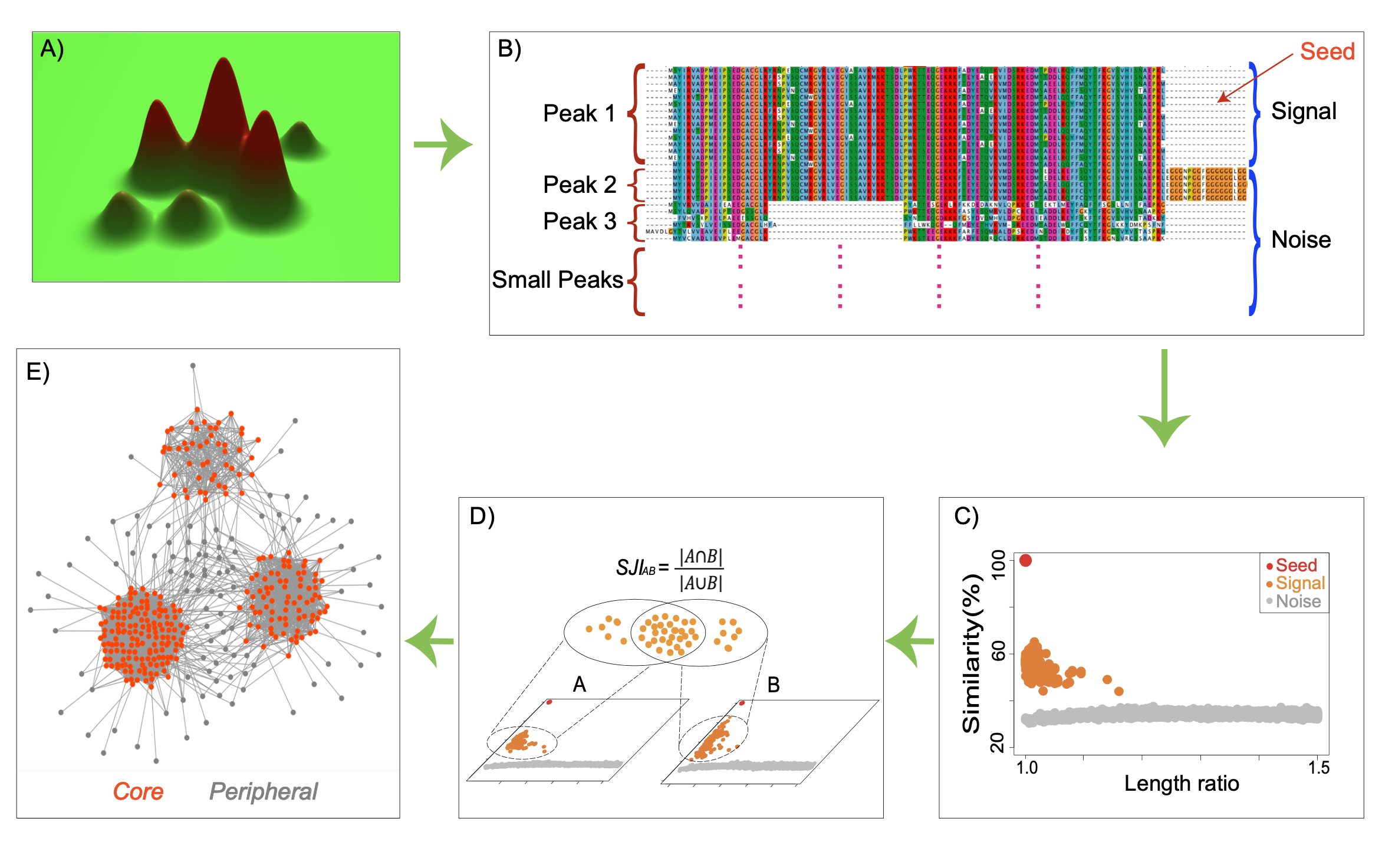
The Signal Jaccard Index compares proteins by the overlap of their signal homolog neighborhoods across proteomes. A high SJI means two proteins share much of the same signal set.
SJI uses many homologs associated with each protein, so it captures broader evolutionary and genomic context.
Signal and noise homologs are separated by data-derived gaps in two-dimensional similarity plots, not by one fixed cutoff.
The Explorer turns SJI relationships into interactive networks where users can expand clusters and inspect local structure.
The current release includes pre-built SJI data for bacterial and eukaryotic UniProt reference proteomes, plus the taxonomy files needed for species-aware browsing.
Browse the NCBI common tree used by the Explorer's species-aware filtering. Highlighted leaves
are the 406 reference proteomes included in the current release. This browser loads its public
taxonomy data from commontree.txt and NCBI_txID.csv in this folder.
Use Docker for the simplest local viewer setup. Use Git if you want to inspect or modify the preprocessing and analysis scripts.
Install Docker Desktop, pull the published image, download the release data, and mount the data folder into the container.
docker pull ghcr.io/gang-fang/sji-network-explorer:latestdocker run --rm \
--name sji-network-explorer \
-p 3000:3000 \
-v "$PWD/data:/app/data" \
ghcr.io/gang-fang/sji-network-explorer:latestLinks: Docker Desktop, data release, and Tutorial data-download instructions.
Clone the repository when you want the source code, runtime scripts, and preprocessing workflows.
git clone https://github.com/gang-fang/network-viz-platform.git
cd network-viz-platform
After cloning, follow the local setup below to install Node.js dependencies, install Python
dependencies, and build topN. The advanced workflows in the tutorial run outside
the Docker container and use scripts under tools/preprocessing and tools/bin.
Links: GitHub repository, Git clone setup tutorial, and source workflow tutorial.
A cloned repository needs Node.js dependencies, Python dependencies, and a compiled topN
executable before ingestion and startup.
# 1. Install Node.js dependencies
npm install

# 2. Install Python dependencies
python3 -m venv .venv
source .venv/bin/activate
pip install -r requirements.txt

# 3. Build topN for preprocessing workflows
cd tools/preprocessing/topN_cpp
make
cd ../../..

# 4. Download and organize the release data
# Follow tutorial.html#first-run:
# download all .gz release assets plus install_data.sh, then run:
chmod 755 install_data.sh
./install_data.sh

# 5. Configure environment
cp .env.example .env
# Edit .env as needed: PORT, DB_PATH, DATA_PATH, PYTHON_COMMAND, etc.
# If using the virtual environment above, set:
# PYTHON_COMMAND=.venv/bin/python

# 6. Ingest data files into the database
npm run ingest

# 7. Start the server
npm start

# Or combine steps 6 and 7:
npm run start:ingest-and-servePlace data files in the expected folders before ingestion. The release data should be downloaded and organized by following the Docker setup data-download section in tutorial.html.
| Directory or file | Environment variable | Expected content |
|---|---|---|
data/networks/ |
DATA_PATH |
Network CSV files. Each line stores one edge as node1,node2,weight. |
data/indexes/ |
INDEXES_PATH |
Preprocessed graph index triplets such as Bacteria.adj.bin, Bacteria.adj.index.bin, and Bacteria.node_ids.tsv. |
data/nodes_attr/ |
NODE_ATTRIBUTES_PATH |
Exactly one *.nodes.attr file with a header row including node_id, NCBI_txID, NH_ID, and NH_Size. |
data/NCBI_txID/NCBI_txID.csv |
SPECIES_PATH |
Two columns: ncbi_txid,species_name. |
data/NCBI_txID/commontree.txt |
TAXON_TREE_PATH |
NCBI common tree text used to render the species filter hierarchy. |
The same paths can be overridden in .env. Important variables include
DB_PATH, DATA_PATH, INDEXES_PATH,
NODE_ATTRIBUTES_PATH, SPECIES_PATH, PYTHON_COMMAND,
SUBNETWORK_SCRIPT_PATH, and PORT.